GDPR-compliant · No cookie banner · Nobody in your data path

Web analytics without
the cookie banner.

TrafficPoppy is GDPR-compliant by design: no cookies, no personal data, nothing stored on your visitors' devices — so there's nothing to ask them to accept. It runs in your own cloud account, so no analytics vendor ever holds your data, and pageviews are unlimited because you're not renting anyone's servers.

Free forever core · optional upgrade /month per site, billed annually · your cloud bill: cents
Installs through AgentsPoppy, the free desktop app — no subscription there either.

https://stats.your-site.com
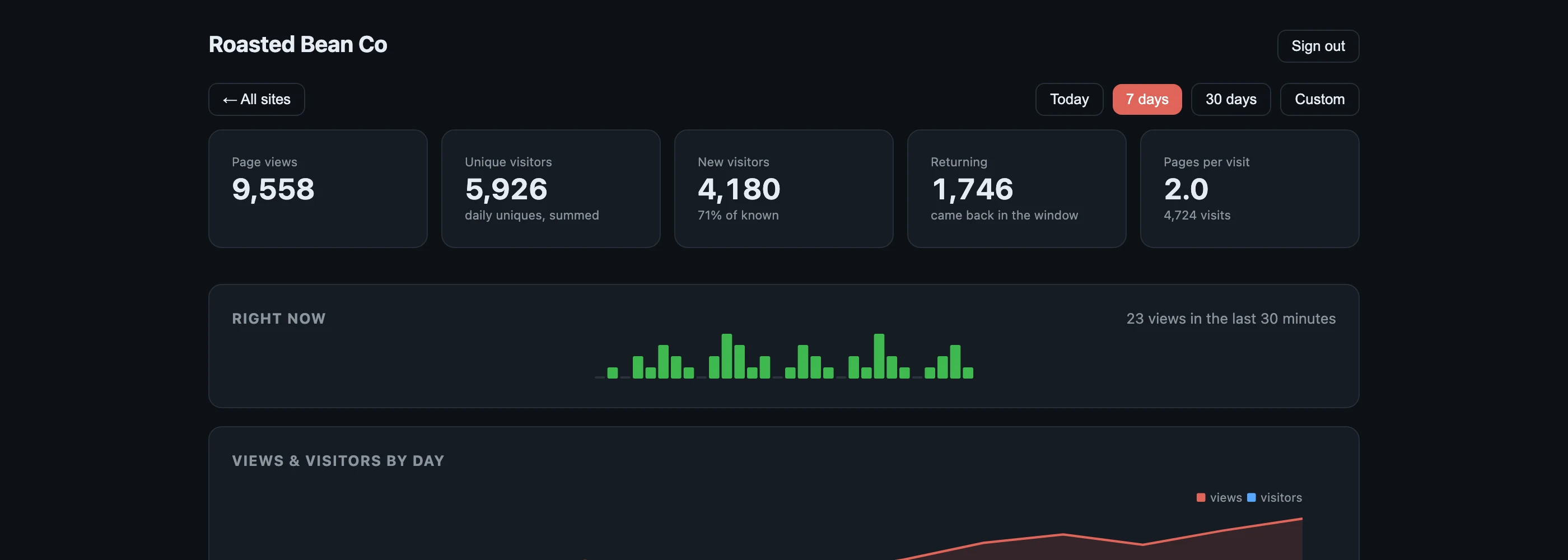
TrafficPoppy dashboard: page views, unique visitors, new vs returning, live ticker and daily trend
GDPR-compliant by design 0 cookies 0 consent banners 0 visitor profiles pageviews websites retention 100% of the data in your own cloud

GDPR-compliant by design.
So there's no banner to show.

Analytics that drop cookies make the law ask your visitors first — so everyone meets a pop-up before they meet your website, and the people who say no aren't counted. TrafficPoppy is built so that there is nothing to ask.

Cookie-based analytics

A decision between every visitor and your page — and "no" means not counted.

TrafficPoppy

Your visitors see your website straight away — and you still get your numbers.

Nothing on the visitor's device

No cookies, no local storage, no fingerprinting. Consent is needed when something is stored on or read from a visitor's device — TrafficPoppy never does either.

No personal data kept

An IP address is used for an instant, in memory, and never written. The salt that counts unique visitors is destroyed on rotation, so nobody can be followed from one day to the next.

No analytics vendor to sign up

Your visitors' data never reaches us — it goes from your website straight into your own cloud account, so there's no analytics processor to vet or sign a data processing agreement with.

You stay the data controller for your own website and its privacy notice, and other tools on your site that use cookies may still need consent. This describes how TrafficPoppy is built; it isn't legal advice. Check the code yourself →

How you get it — and why there's a second app

TrafficPoppy isn't a website you sign up to. It's a poppy: a small app that installs its own backend into your cloud account. The thing that does that installing is AgentsPoppy — a free desktop app, and the honest reason we send you there first.

1

Install AgentsPoppy — free

The desktop app for macOS, Windows & Linux that installs poppies into your own cloud. No subscription, no account with us, no credit card. It's how you connect your cloud account once, with tightly scoped permissions you can read before approving.

2

Add TrafficPoppy — one click

Pick it from the catalogue inside the app. It deploys a small serverless backend to your cloud account — collector, counters, nothing else — and hands you a one-line script tag for your site.

3

Paste the tag, watch the numbers

Statistics appear in the app immediately. Want them online at stats.your-site.com, shareable with your team? That's the Advanced Stats upgrade (/month, billed annually) — everything else stays free forever.

So, what does AgentsPoppy cost?

Nothing. The platform is free to download and free to use — it makes its money only when a developer sells a premium feature inside a poppy, like our Advanced Stats upgrade. You pay your cloud provider for what you actually run (cents a month for a typical site), and nobody meters your traffic. Read about AgentsPoppy →

Download AgentsPoppy — free

Opens agentspoppy.com · macOS, Windows & Linux · TrafficPoppy is inside its catalogue

Cookieless is table stakes.
Owning your data is the upgrade.

Plenty of good tools removed the cookie banner. But almost all of them still hold your traffic data on their servers, meter your pageviews, and bill you monthly for the privilege. TrafficPoppy removes the vendor, not just the cookie.

Nothing to leak, sell or subpoena

No visitor identifiers exist anywhere — not in transit, not at rest. Visitors are counted with a salted hash whose salt is destroyed on a rotating window (24 h by default). IP addresses are never written. GPC and Do-Not-Track are honoured absolutely: those visits aren't counted at all.

Your cloud, your counters

A small serverless collector and a table of aggregate counters, in your own cloud account. You can read every row with your own credentials, export everything, and one click removes the whole footprint — verified to leave no trace.

Unlimited by construction

Hosted services meter pageviews because they pay for hosting. Your collector runs serverless in your own account, so a traffic spike costs you cents — never a plan upgrade, never a "you've hit your limit" email in your best week.

Everything you actually check, nothing you have to explain to a lawyer

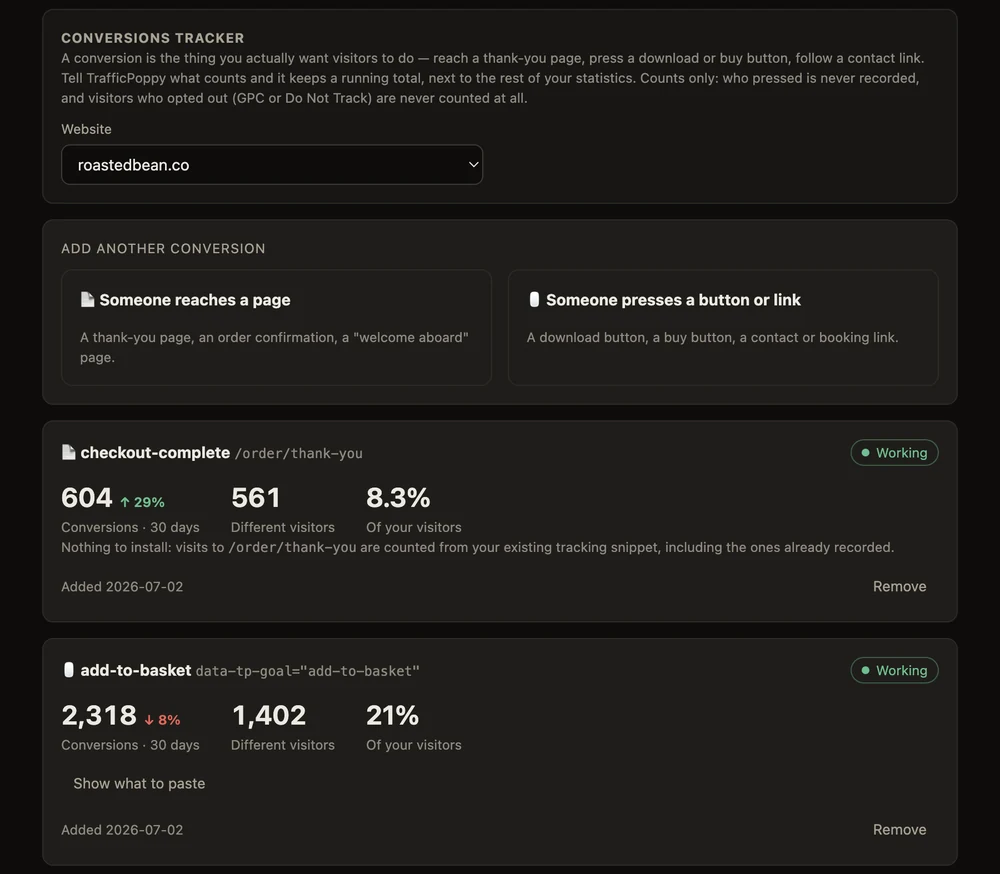
Conversions tracker

Part of Advanced Stats. Count the thing you actually wanted: visits to a thank-you page (retroactive — it counts the ones already recorded), or presses of a download, buy or contact button. Conversions, how many different visitors, and the rate, next to the rest of your stats.

Live & daily views

A last-30-minutes ticker, views and visitors by day, busiest hours, new vs returning — with change vs the previous period on every number.

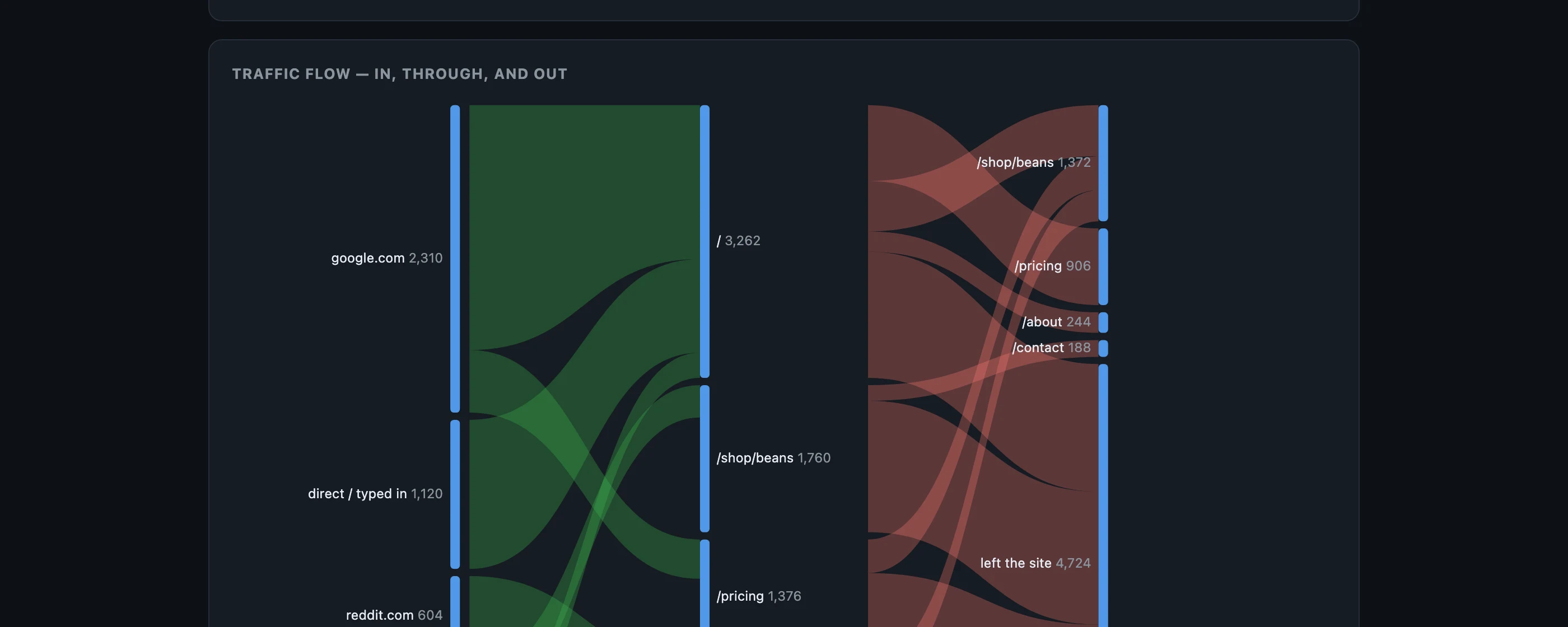
Traffic flow

See where visits come in, how they move through the site, and where they leave — as aggregate flows, never as individual journeys.

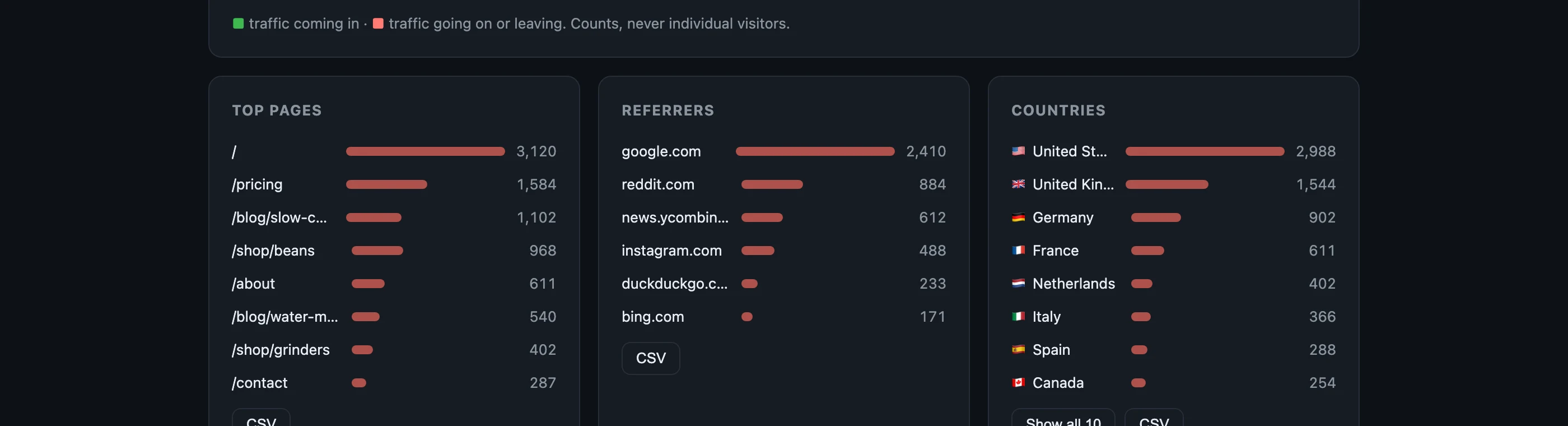
Countries, pages, referrers

Top pages, referrers, campaigns (utm source/medium/campaign only), browsers, systems, screen sizes — and visitor countries with the upgrade.

Ad-blocker-proof counting

With Advanced Stats your script serves from stats.your-site.com — first-party, so blocklists stop hiding a slice of your audience.

Team access

Invite clients or teammates by email. They read your stats from any browser or phone — and can never touch your sites or your cloud account.

Backup & restore

Save every number to a local file and bring it back after a fresh setup. Backups contain nothing about individual visitors — there is nothing of that kind to back up.

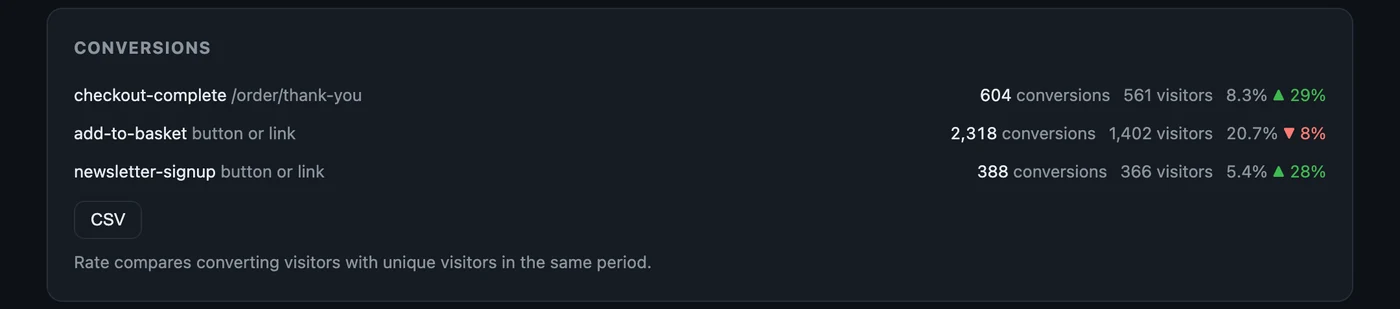
Conversions card: checkout-complete, add-to-basket and newsletter-signup with conversions, different visitors, rate and change vs the previous period
Conversions, on the same page as everything else — with how many different visitors converted, not just how many clicks.
The Conversions tracker: pick a website, choose whether someone reaches a page or presses a button, and each goal shows a green Working badge with its numbers
Setting one up is one question: does someone reach a page, or press a button? Each goal then proves it's working.
Traffic flow chart: sources coming in on the left, pages in the middle, onward movement and exits on the right
Traffic flow — in (green), through, and out (red). Counts, never individual visitors.
Top pages, referrers and visitor countries with flags
Top pages, referrers and countries — every list exports to CSV.

Honest comparison with the tools we admire

A handful of privacy-first services proved the world doesn't need cookies to understand traffic, and we admire them for it. The difference is architectural: they host your data, we don't touch it. And on price it isn't close — TrafficPoppy is the cheapest comparable product there is, because you host it yourself and there's almost nothing left for us to charge for.

TrafficPoppyTypical hosted analytics
average of the leading privacy-first services
Cookieless, no bannerYesYes
Analytics vendor processing your visitors' dataNone — no data processing agreement neededYes — they process it on their servers
Who stores your dataYou — your own cloud accountTheir servers
Pageview limitsNoneMetered — allowance runs out, plan goes up
Entry price$0 · upgrade /mo per site, billed annually~$11/mo
A year of the paid tier~$130
Conversion goalsWith Advanced Stats — pages (retroactive) + buttonsYes
Traffic-flow chartYesRarely
Runs without any vendorYes — even we can't see your dataNo — cloud only, or servers you run yourself

The comparison column is the average of the published entry plans of the leading cookieless hosted analytics services, checked August 2026; prices and allowances move, so treat it as the going rate rather than any one product's quote. Your cloud costs stay yours — typically cents per month at small-site traffic.

Pricing that looks like a typo

Because you host it yourself, there's almost nothing for us to charge for.

Free core

$0
forever
  • Unlimited websites
  • Unlimited pageviews & retention
  • Full desktop dashboard in AgentsPoppy
  • Live ticker, trends, pages, referrers, campaigns
  • CSV export · data readable in your own cloud account
  • One-click removal, verified to leave no trace
Start free

Installs via AgentsPoppy — the platform is free too

The whole story of a page view

This is everything TrafficPoppy ever records about a visit. There is no more detailed data anywhere — not hidden, not aggregated later, not "anonymised". It never existed.

Page path/pricing — never query strings
Referrer hostnamegoogle.com — never the full URL
Campaign tagsutm_source, utm_medium, utm_campaign — nothing else
Browser & systemChrome · macOS · screen class
Countrywith Advanced Stats — country only, never city or IP
A daily salted hashto count uniques — salt destroyed on rotation, unlinkable across windows

Not recorded, ever: IP addresses, cookies, fingerprints, session recordings, cross-site anything. Visitors with Global Privacy Control or Do-Not-Track are not counted at all — no exceptions, no override switch.

Questions people actually ask

Do I need a cookie banner?

No. TrafficPoppy is GDPR-compliant by design: it sets no cookies, stores nothing on your visitors' devices and keeps nothing that identifies a person, so there's nothing to ask consent for. Visitors sending Global Privacy Control or Do-Not-Track aren't counted at all. (Other tools on your site that use cookies may still need a banner of their own.)

Is it really GDPR compliant?

Yes, by design. Consent is required when something is stored on or read from a visitor's device, or when personal data is kept — and TrafficPoppy does neither. IP addresses are used only in memory and never written; the salt that counts unique visitors is destroyed on rotation, so no one can be followed across days; and your statistics are anonymous counts in your own cloud account. Your visitors' data never reaches us, so there's no analytics vendor to sign a data processing agreement with. You remain the controller for your own website and its privacy notice — this describes how the product is built, not legal advice.

Where exactly does my data live?

In your own cloud account, as aggregate counters (views per page per day, referrer counts, and so on). You can read it with your own credentials whenever you like — the schema is documented, and there's no lock-in to escape from.

What does it cost to run in my cloud?

The stack is serverless and billed per use: for a typical small or medium site it comes to cents per month, and nothing at all when nobody visits. The app shows what it spends instead of hiding it behind a plan.

Is there really no pageview limit?

Really. Metering exists because hosted vendors pay for the servers your data sits on. Yours sits in your account, so your best traffic day costs you cents — not an upgrade conversation.

What is AgentsPoppy, and is it free too?

It's the free desktop app that installs "poppies" — small, auditable apps that deploy their backend into your own cloud with tightly scoped permissions you approve, and remove themselves without a trace. It costs nothing: no subscription, no account with us, no card. The platform earns only when a developer sells a premium feature inside a poppy — for us, the Advanced Stats upgrade. TrafficPoppy is one click inside its catalogue.

Can I track conversions — signups, downloads, purchases?

Yes — the Conversions tracker comes with Advanced Stats, and setting one up is a single question: does someone reach a page (a thank-you or order-confirmation page — this kind counts retroactively, including visits already recorded), or does someone press a button or link (add one small attribute, data-tp-goal="download", to it — the app hands you a prompt for whatever AI edits your site, and the goal turns green on the first press). You then see conversions, how many different visitors converted, the rate, and the change vs the previous period — with a CSV. It stays counters: who converted is never recorded.

Can my team or my clients see the stats?

With Advanced Stats, yes: your statistics page lives at stats.your-site.com, and you invite people by email. They can read from any browser or phone, they can never change anything, and you can revoke access at any moment.
Download AgentsPoppy — free

TrafficPoppy installs from inside it, also free · macOS, Windows & Linux · needs your own cloud account · removable in one click